Vertical 9:16
Built for TikTok, Reels and Shorts. The shot starts wide on the steps with you standing dead center, and waves roll out through the crowd on either side of you.
One photo puts you at the dead center of the Yung Lean Storm scene: you hold completely still on stone steps as dozens in matching blazers drop, lift and sweep past in lockstep. Vertical for the feed, or wide the way the film framed it.
Short answer: One photo is all DanceRemake needs for the Storm II AI crowd dance: you hold still at the center of wide stone school steps while dozens in matching navy blazers drop, lift and sweep around you on the beat. Choose 9:16 or 16:9, sign in with Google, and within a few minutes you can download a clean 15-second MP4, music included and no watermark on it. One video uses 10 credits ($9.99 bought on its own); nothing is generated for free.
Your photo1 needed
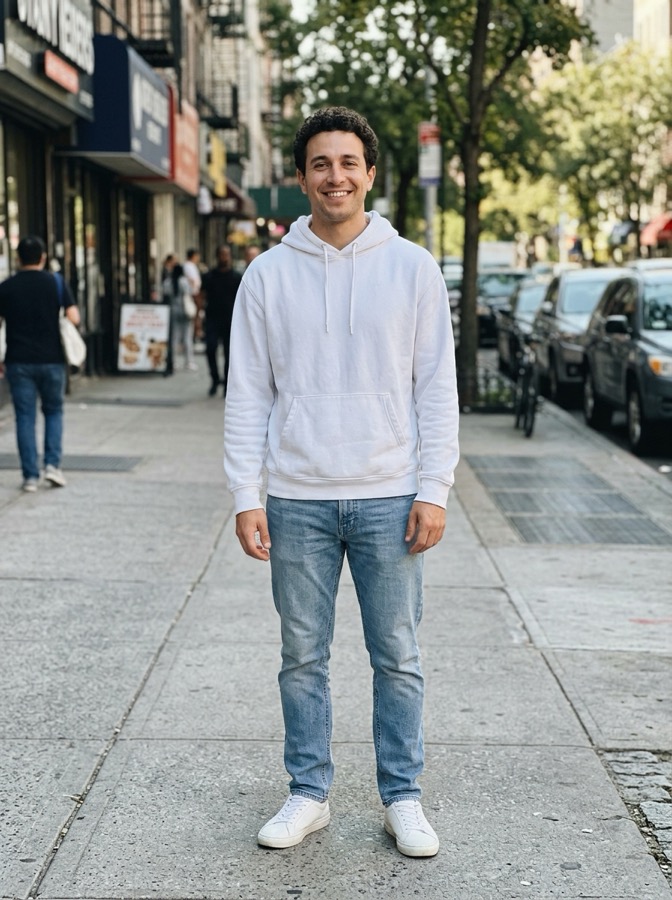
One adult facing the camera, framed from the waist up, soft even light, empty hands and nobody else in the shot. Skip mirror selfies, sunglasses, screenshots and photos of celebrities. JPG, PNG or WebP, 10 MB max.
What you getFixed
Sign in with Google at the next step.
Failed renders are refunded automatically. Photos are deleted after 30 days.
What changes
More examples
The trend
Behind the trend sits STORM, a 2026 short film made for GENER8ION with Yung Lean in it. Romain Gavras directed it and Damien Jalet built the choreography. One shot gets quoted more than the rest: a school photo lined up on stone steps, where dozens of boys in uniform suddenly move as a single body while one figure at the center never moves at all. September 2026 is when people started rebuilding that shot with AI, casting themselves or a friend as the motionless one. It goes around as the Yung Lean Storm AI trend too.
What this dance gives you is a fresh 15-second take on the same idea: you planted in the middle, perfectly still, surrounded by adults in navy blazers who move around you, under an original electronic beat. Choose 9:16 if it is headed for TikTok or Reels, or 16:9 to match the film, which starts on a close-up of your face before the crowd kicks in. No celebrity appears and no song is used; the video is newly generated AI footage, not the film. DanceRemake is not connected to Yung Lean, GENER8ION or anyone who made the film.
Stillness is the gag. The whole crowd behaves like one organism and you do absolutely nothing, which somehow makes you the center of the frame. So people cast themselves in it, or the friend whose face never changes, or their manager.
Timeline
GENER8ION puts out the short film STORM, with Yung Lean in it, choreography by Damien Jalet, directed by Romain Gavras. The scene on the school steps is the one that gets remade.
Tools that can rebuild a clip around a new person arrive, and versions of the scene with a different face in the middle begin to circulate.
Yung Lean and GENER8ION play the film's closing scene live on the MTV VMAs stage.
US search puts the trend at the top of the fastest-rising memes, and DanceRemake ships the dance in both shapes.
Two ways
Built for TikTok, Reels and Shorts. The shot starts wide on the steps with you standing dead center, and waves roll out through the crowd on either side of you.
The film's framing. It starts close on your face with rows of dancers behind you, you step into the crowd as the camera backs away, and the steps fill with movement around you.
Photo tips
The wide shots show your whole outfit, so a standing photo from head to shoes helps.
The camera sits on you looking into the lens, so a flat expression suits it better than a big smile.
Everyone around you is in navy, so a pale or bright outfit makes you pop in the middle.
How-to
One adult with the face in clear view. Head to toe keeps your outfit.
Go vertical 9:16 for the feed, or wide 16:9 like the movie, which opens tight on you.
In a few minutes the 15-second MP4 lands in My videos. If you want the Storm II track on it, add that from TikTok's library.
Before you pay
Yes. Each clip is rendered fresh on paid AI models, so there is no free tier. One video takes 10 credits ($9.99 for a single one, less per video in bigger packs), and the MP4 you download carries no watermark.
DanceRemake is an unofficial fan-made tool with no tie to GENER8ION, to Yung Lean, or to Romain Gavras and Damien Jalet. What you download is newly generated AI footage with an original beat, not the film and not its song.
Both examples here play without an account. Signing in with Google comes later, when it is your turn to make one.
Refunds: a render that fails returns its credits on its own, and if you bought a credit pack by mistake and never spent it, you can get your money back within 14 days.
FAQ
No, and that is the joke: you are the one person holding completely still while the crowd works around you.
Neither. You get newly generated AI footage with an original electronic beat. If you want the Storm II audio on top, add it from TikTok's library once you post.
Both, and the cost is identical: pick 9:16 for the vertical feeds, TikTok, Reels and Shorts, or 16:9 to match the film, where the shot starts tight on your face and pulls out as the crowd begins.
Fifteen seconds, either 9:16 or 16:9, and the shape makes no difference to the cost.
Easily. You are the only motionless figure, you are in the middle, and you are in your own clothes while everybody around you wears a navy blazer and keeps moving.
No. STORM is a real short film with real dancers, from director Romain Gavras and choreographer Damien Jalet. AI only came later, when people started redoing its school-steps scene.
The song arrived in two parts, Storm I and then Storm II, sharing one film. People post the scene with the second part, so the AI versions carry that name.
Who it's for
You at the center of all that motion, completely unbothered.
Drop the calmest person you know into the middle of it.
The founder, or whoever leads the team, standing still inside a moving crowd.
Up next
The doors shut in your face, so you dance on the platform.
Your crew sings the chorus into one phone in Seoul.
You in the cowboy hat, strutting through the quinceañera.
Two of you, side by side, on the red-walled routine.
Squat low, grip handlebars nobody can see, outrun the hover-bike cop.
A new dance blew up today?
We add this week's dances as soon as they take off.